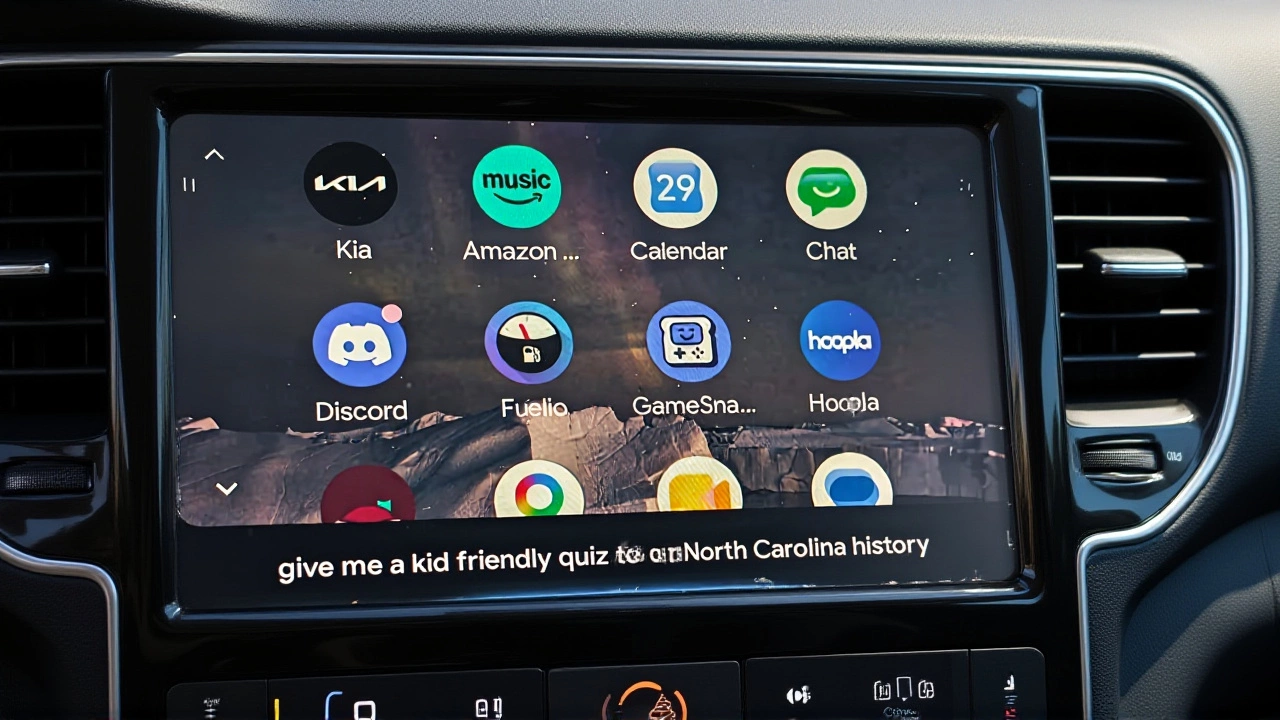
There’s a quiet revolution happening in our cars, and it doesn’t involve electric motors or autonomous driving. It involves the screen on your dashboard. For years, we’ve accepted that a vehicle’s built-in infotainment system is the default way to navigate, listen to music, and make calls. But increasingly, drivers are plugging in their phones and bypassing the factory software entirely. The reason? Android Auto, developed by Google, has evolved from a simple projection tool into a superior operating environment that leaves most native car systems in the dust.
The shift isn't just about preference; it's about functionality. Recent analysis from tech outlet ZDNET highlights why users are making the switch and, crucially, why they can't go back. The core issue with traditional automotive software is stagnation. When you buy a car, its brain is essentially frozen in time. Sure, you might get occasional over-the-air updates for bug fixes, but don't expect a complete interface overhaul or new feature sets five years down the line. In contrast, Android Auto lives on your phone, meaning it evolves at the speed of the internet, not the sluggish pace of automotive engineering cycles.
The App Ecosystem Gap
Here’s the thing: most car manufacturers treat apps as an afterthought. If you rely on your vehicle’s native system, you’re likely stuck with one navigation app, one media player, and maybe a basic phone interface. That’s it. You have no choice. Android Auto flips this model on its head. It gives you access to the entire Android ecosystem. Want to use Waze instead of Google Maps? Go ahead. Prefer Spotify over Apple Music? No problem. You can even access widgets for weather updates, smart home controls, and calendar alerts directly on the dashboard.
This variety matters more than you’d think. It means your car adapts to your habits, not the other way around. While some high-end vehicles now run Android Automotive—a full embedded OS—the majority still rely on legacy systems that feel clunky by comparison. Android Auto bridges that gap, turning any compatible car into a modern digital hub without requiring a dealership visit or a firmware update that may never come.
Gemini Changes the Voice Game
If there’s one feature that has genuinely surprised me, it’s the integration of Google Gemini. Previously, I avoided using voice commands in my car because they were notoriously unreliable. Ask for "Italian food nearby," and the system would often misunderstand or fail to respond. With Gemini integrated into Android Auto, that experience has transformed completely.
Gemini understands context better, processes natural language more effectively, and executes commands with startling consistency. It’s become my favorite enhancement to the platform. Whether I’m asking for complex directions, sending a detailed text message, or controlling my smart home devices while parked, the accuracy is night and day compared to the built-in assistant. This isn't just a minor tweak; it’s a fundamental improvement in how we interact with technology while driving safely.
Portability and Privacy Wins
Think about the last time you rented a car or borrowed a friend’s vehicle. Did you spend ten minutes trying to figure out their touchscreen interface? Probably. That friction disappears with Android Auto. Plug in your phone (or connect wirelessly if supported), and boom—you’re back in your familiar environment. Your playlists, your saved addresses, your preferred apps—they’re all there. This portability is invaluable for frequent travelers or anyone who drives multiple vehicles.
Then there’s the privacy angle, which is often overlooked. Built-in systems require you to log into accounts directly on the car’s hardware, storing sensitive data like your email, contacts, and location history in the vehicle’s memory. With Android Auto, your data stays on your phone. The car acts merely as a display and input device. When you disconnect, your personal information goes with you. It’s a cleaner, safer approach that minimizes the risk of data lingering in a vehicle you no longer own or control.
Troubleshooting the Connection
Of course, no technology is perfect. Android Auto relies on a stable connection between your phone and the car. If you’re using a wired connection, the quality of your USB cable matters immensely. A cheap charging-only cable won’t work; you need one that supports data transfer. Frayed wires or loose ports can cause intermittent disconnections, which is frustrating when you’re mid-commute. Experts at AAWireless recommend keeping a spare high-quality data cable in your glovebox just in case.
For wireless users, ensure your phone’s Bluetooth and Wi-Fi are functioning correctly, as Android Auto uses both to maintain the link. If the app misbehaves, clearing the cache via Settings > Apps > Android Auto > Storage & cache often resolves glitches. Remember, though, that this may reset custom settings, so note them down first. Also, keep an eye on updates; unlike some systems that auto-update, Android Auto sometimes requires manual checks in the Google Play Store to ensure you’re running the latest version with security patches and new features.
What’s Next for In-Car Tech?
The trajectory is clear. As smartphones become more powerful, the processing power in our pockets will continue to outpace that in our dashboards. We’ll see deeper integrations with AI, more seamless handoffs between devices, and perhaps eventually, fewer buttons altogether. But until every car manufacturer catches up to the agility of mobile software, Android Auto remains the pragmatic choice for drivers who want their vehicles to feel current, connected, and personalized.
It’s not just about convenience; it’s about control. By choosing Android Auto, you’re opting out of a static, limited experience and stepping into a dynamic, evolving ecosystem. And once you’ve tasted that level of flexibility, going back to the factory default feels like taking a step backward in time.
Frequently Asked Questions
Does Android Auto work with iPhone?
No, Android Auto is designed exclusively for Android smartphones. iPhone users must use Apple CarPlay, which offers similar functionality but within the Apple ecosystem. Both systems project your phone's interface onto the car's display, but they are not cross-compatible.
Is Android Auto free to use?
Yes, Android Auto is a free application available on the Google Play Store. However, some individual apps accessed through Android Auto, such as premium music streaming services or advanced navigation tools, may require separate subscriptions.
How does Android Auto protect my privacy?
Android Auto keeps your personal data, including login credentials and contact lists, stored on your smartphone rather than in the car's internal storage. This means when you disconnect your phone, your sensitive information doesn't remain in the vehicle, reducing the risk of data exposure if you sell or lend the car.
Can I use Android Auto without a USB cable?
Yes, if your vehicle supports wireless Android Auto. Many newer models offer this feature, allowing you to connect automatically when you enter the car. If your car only supports wired connections, you can purchase third-party wireless adapters, though these add extra cost and potential points of failure.
What is the difference between Android Auto and Android Automotive?
Android Auto is a projection system that runs on your phone and displays on the car's screen. Android Automotive is a full operating system installed directly into the car's hardware by the manufacturer. While both offer similar apps, Android Automotive is more deeply integrated with vehicle functions like climate control and diagnostics.